Apache ResilientDB is a high-throughput, blockchain-based distributed database, built on cutting-edge consensus research and evolving quickly and that combination of power and pace is exactly what makes it worth building for.
ResAI was built to make that power easier to reach, a suite of AI-powered tools, each designed around a specific part of the ResilientDB experience, to make it faster and more intuitive to learn, explore, and build. This is not a single tool but a toolkit, and an ongoing one, there is always more ground to cover, and this post doesn’t claim to close the gap entirely. What it does cover are three tools built to address some of the most impactful parts of that journey:
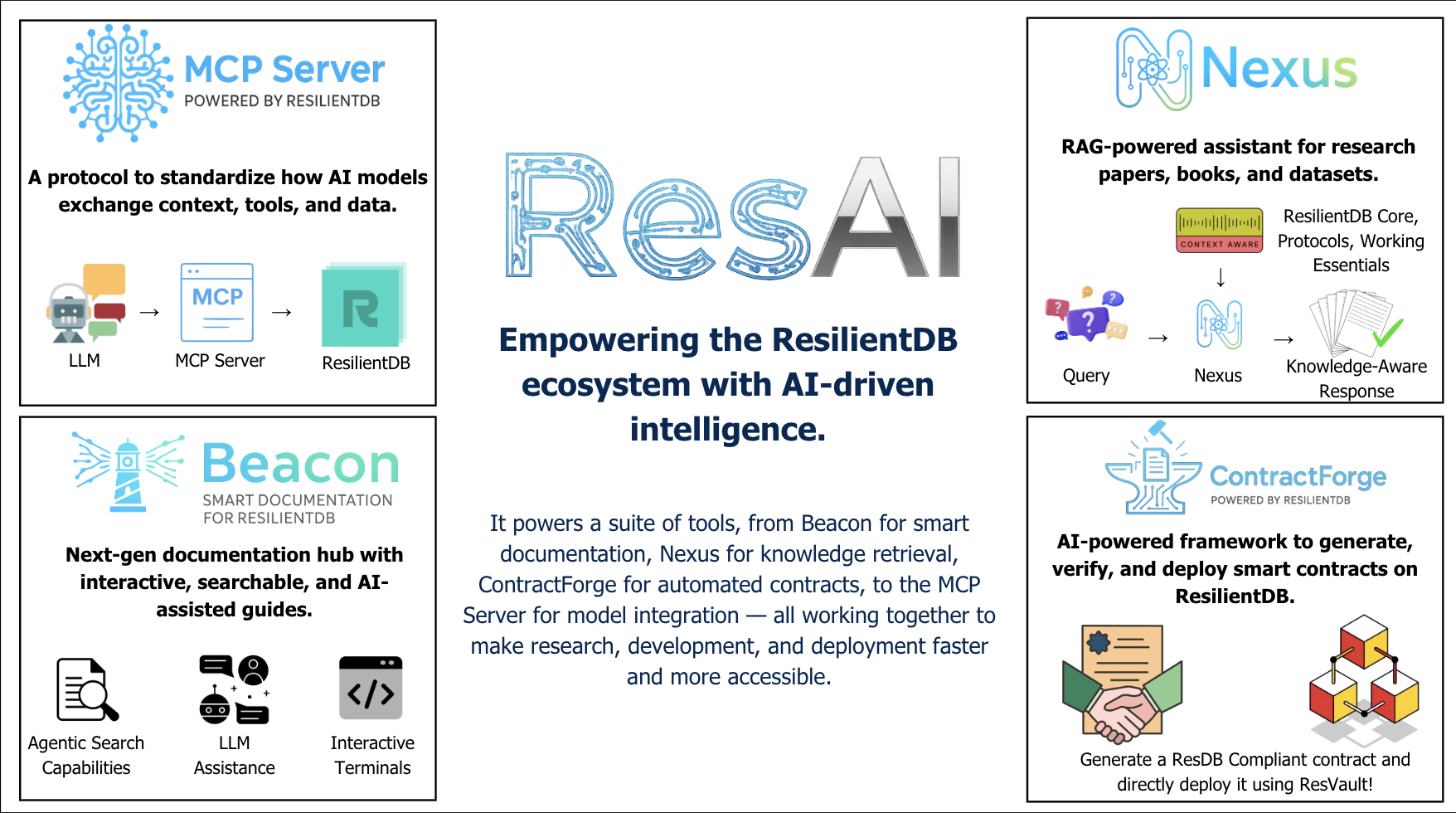 The ResAI suite — Beacon, Nexus, ContractForge, and the MCP server, around one hub.
- Beacon — a modular, AI-native documentation hub for ResilientDB, combining up-to-date theoretical coverage of the codebase with agentic search, in-browser IDEs and terminals to test tooling directly, and a chatbot for answering questions about the system.
- ContractForge — a ResilientDB-context-aware smart contract generator that uses generative AI to draft, and deploy contracts in one click, removing the need for prior smart contract experience.
- Nexus — a RAG-based research tutor with context over the core blockchain, database, and consensus protocol papers underlying ResilientDB, letting users query specific papers, get cited answers, or search the web for more. Each of these is covered in depth later in this post, alongside the broader body of work that strengthens ResilientDB as a system.
Motivation
The ecosystem around ResilientDB has grown to include a wide range of applications and tooling, yet a newcomer often has to piece together how everything fits together on their own, without a guided path or a place to safely experiment first. When I started working with it, that gap was immediately obvious. I felt overwhelmed by the sheer amount of tooling and knowledge the project carries, and by how much of it I had to reconstruct on my own just to get oriented. Understanding what ResilientDB can do was one thing; getting comfortable enough to actually build with it was another.
That gap is where the idea for ResAI came from. At the same time, AI and agentic AI were having their own moment — the timing felt right to ask a different question: instead of just documenting the system better, could AI itself become part of the tooling? Could it lower the ramp-up time for someone new, the same way it had overwhelmed me when I started? The less time spent ramping up and setting things up, the more time there is to actually use the system and that tradeoff became the guiding idea behind everything in ResAI.
Approach
Before getting into any individual tool, it helps to start with the ResAI Hub — the front door to everything in this post. Each tool in the ResAI suite has its own interface, its own workflow, and is built to stand on its own. The Hub doesn’t replace that; it’s the starting point that ties them together, a single library where anyone can discover what’s available and jump into the right tool for what they’re trying to do.
With that grounding in place, let’s dive deeper into each tool and its mechanics.
Beacon
Beacon is ResAI’s front door; the documentation, learning, and AI-assisted developer hub for the ResilientDB ecosystem. It’s not a static docs site: under the hood it’s a Next.js 15 + Nextra 4 + Mantine 8 app combining unified MDX documentation, in-browser playgrounds for Python, TypeScript, and Solidity, multiple AI surfaces, and a set of AI-generated deep-dive chapters on ResilientDB’s internals, all without leaving the browser.
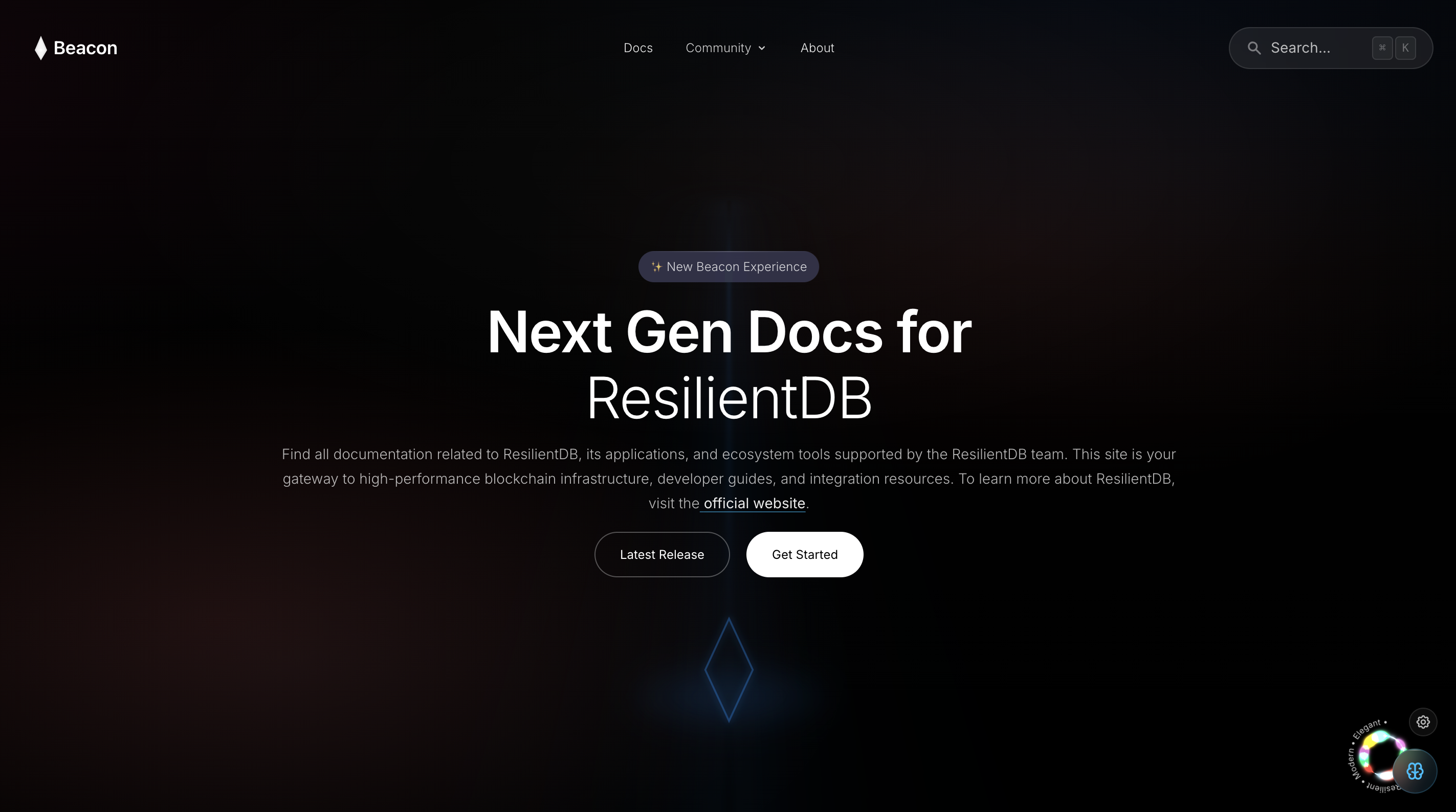 Beacon’s homepage — next-gen docs for ResilientDB, with search, playgrounds, and a path into the ecosystem.
Terminal Playgrounds — Run Real Code, No Install Required
The flagship feature is the Python Playground, embedded directly into pages like the Python SDK and GraphQL docs. It runs Python entirely client-side via Pyodide (Python compiled to WebAssembly) in a CodeMirror 6 editor, loads a simplified ResDB SDK as a real module, and — the part that matters — doesn’t mock the examples. They hit ResilientDB’s live public testnet at crow.resilientdb.com, so a first-time reader can send and retrieve real key-value transactions straight from the docs, with color-coded terminal output and zero pip install.
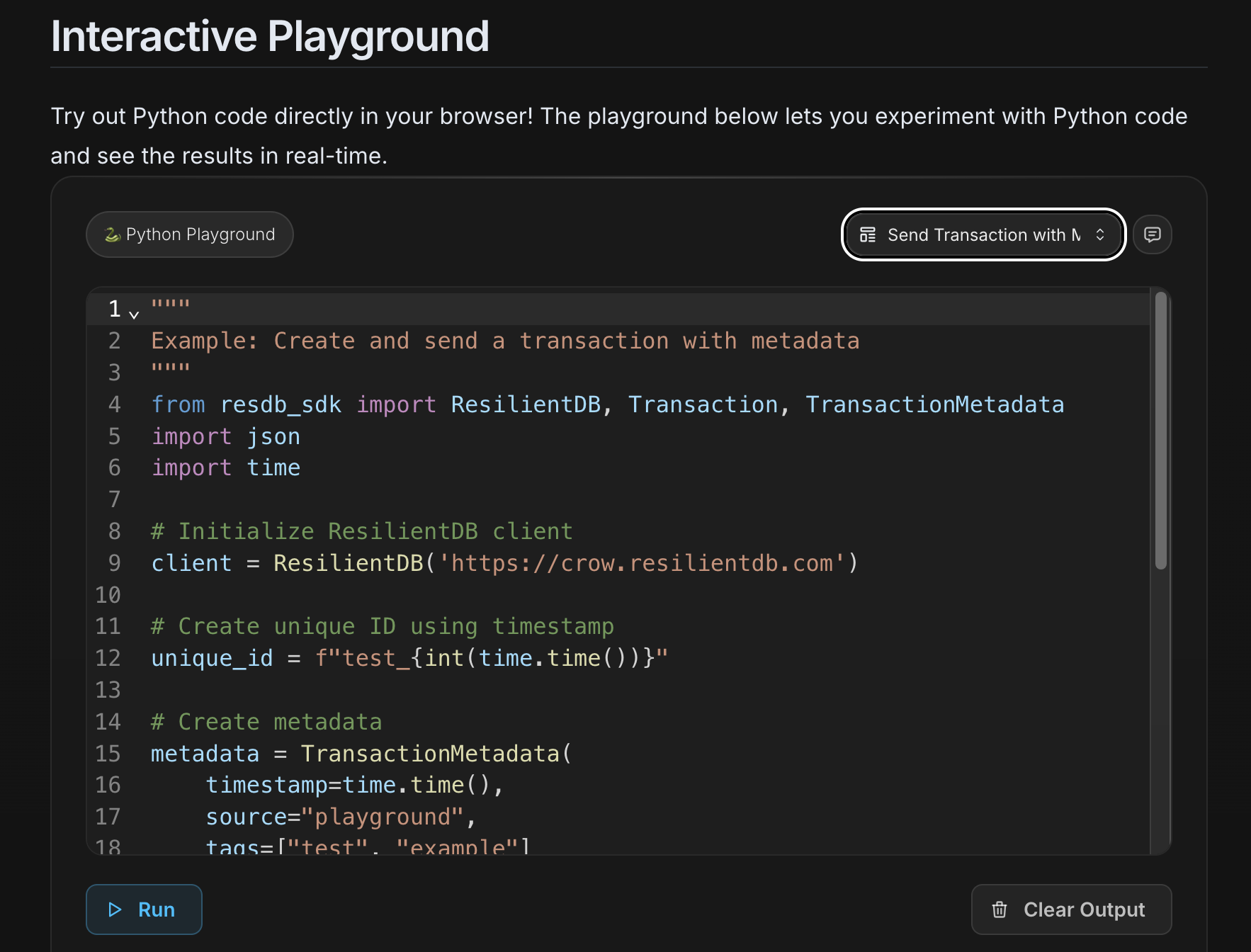 The Python Playground — ResDB SDK code in the browser, run against the live testnet, no install required.
The same pattern extends further:
- A TypeScript Playground compiles TS to JS in-browser, sandboxed, with templates for async/await, generics, and decorators.
- A lighter Split IDE embeds inline in any doc page — editor on one side, terminal on the other.
- A Solidity Playground compiles contracts server-side via
solc, returns ABI and bytecode, and ships with example contracts and a step-by-step tutorial. - Interactive config and query builders on the caching docs let readers generate sync configs or build queries against cached blockchain data, live.
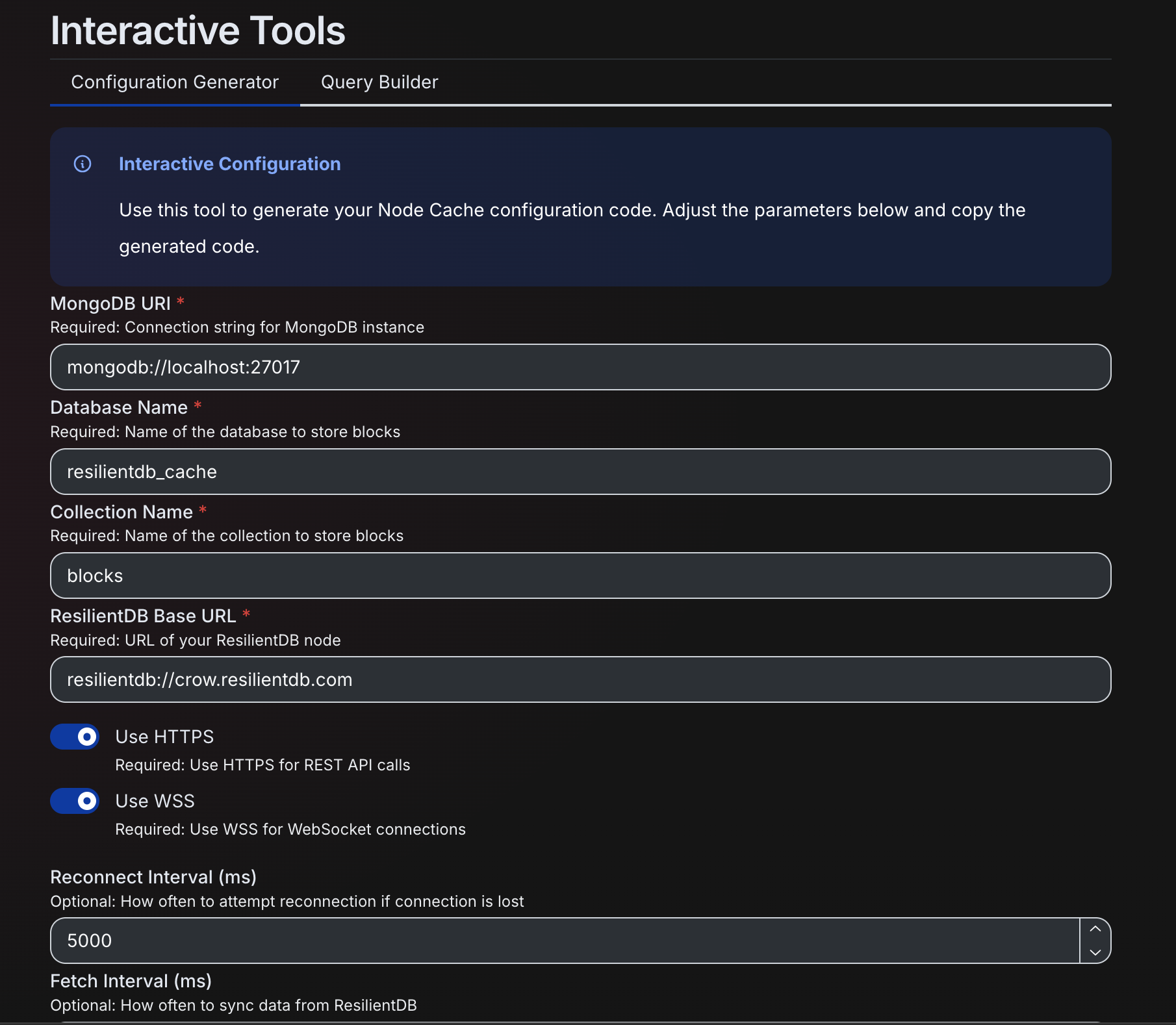 Interactive tools on the caching docs — fill in MongoDB and ResilientDB parameters, get a ready-to-copy Node Cache config.
Every playground shares the same idea: read the concept, immediately run it, see the output.
The AI Assistant — Highlight Text, Get an Explanation
Beacon layers three AI chat surfaces, from lightweight to deep. The always-on one is the Floating Assistant, pinned to every doc page, highlight any confusing paragraph and it auto-opens with a streamed explanation via DeepSeek’s deepseek-chat, no button hunting required. It’s smart enough to skip selections inside code blocks so it doesn’t try to “explain” your own code back to you.
Inside the playgrounds, an in-context AI panel takes the current code plus conversation history and answers questions grounded in what’s actually on screen.
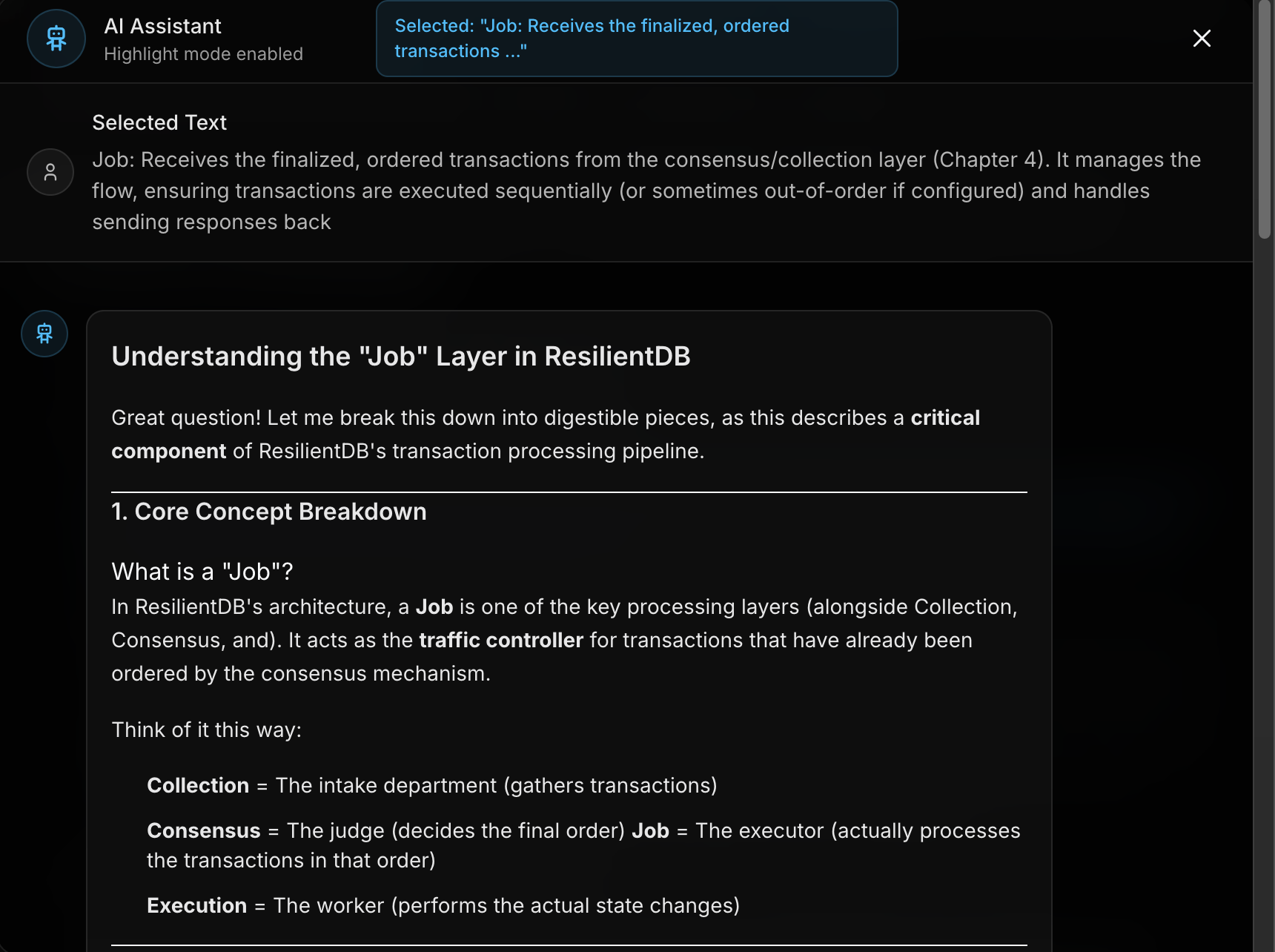 Highlight a paragraph, get a streamed explanation. Here the assistant unpacks ResilientDB’s Job layer with an analogy.
Agentic Search — Not Just Keyword Matching
The search bar runs two modes. ⌘K gives fast static Pagefind search. ⌘J switches to “Ask Our Agent”; a hybrid pipeline that’s the most technically interesting piece of Beacon. A query first runs through synonym expansion against a hand-built ResilientDB domain map, then DeepSeek generates 5–8 domain-specific search terms from the question itself. Those combine with keyword scoring (60% keyword match, 40% AI-generated term match) across an index chunked by section, not by file, so results link straight down to the exact heading instead of dropping you at the top of a page. In short: it doesn’t just match your words, it uses an LLM to guess what you meant, then ranks against that.
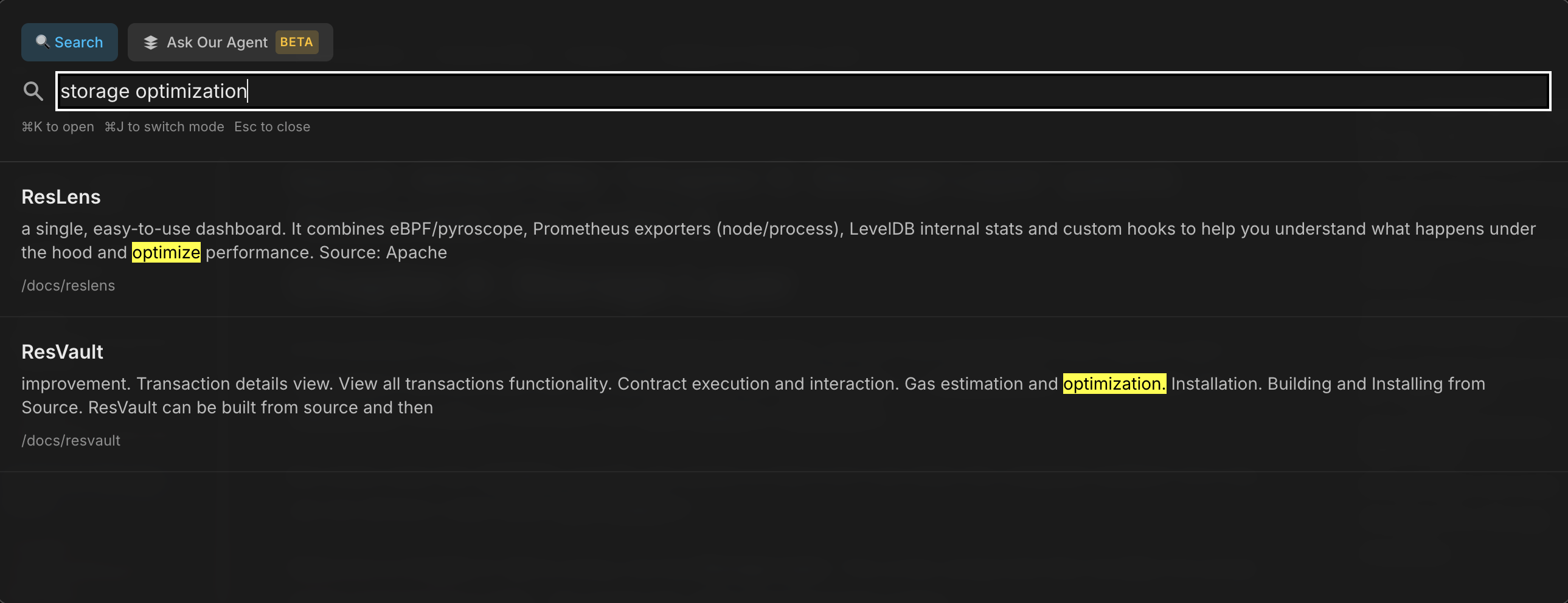 ⌘K keyword search: Pagefind matching “storage optimization” across the docs.
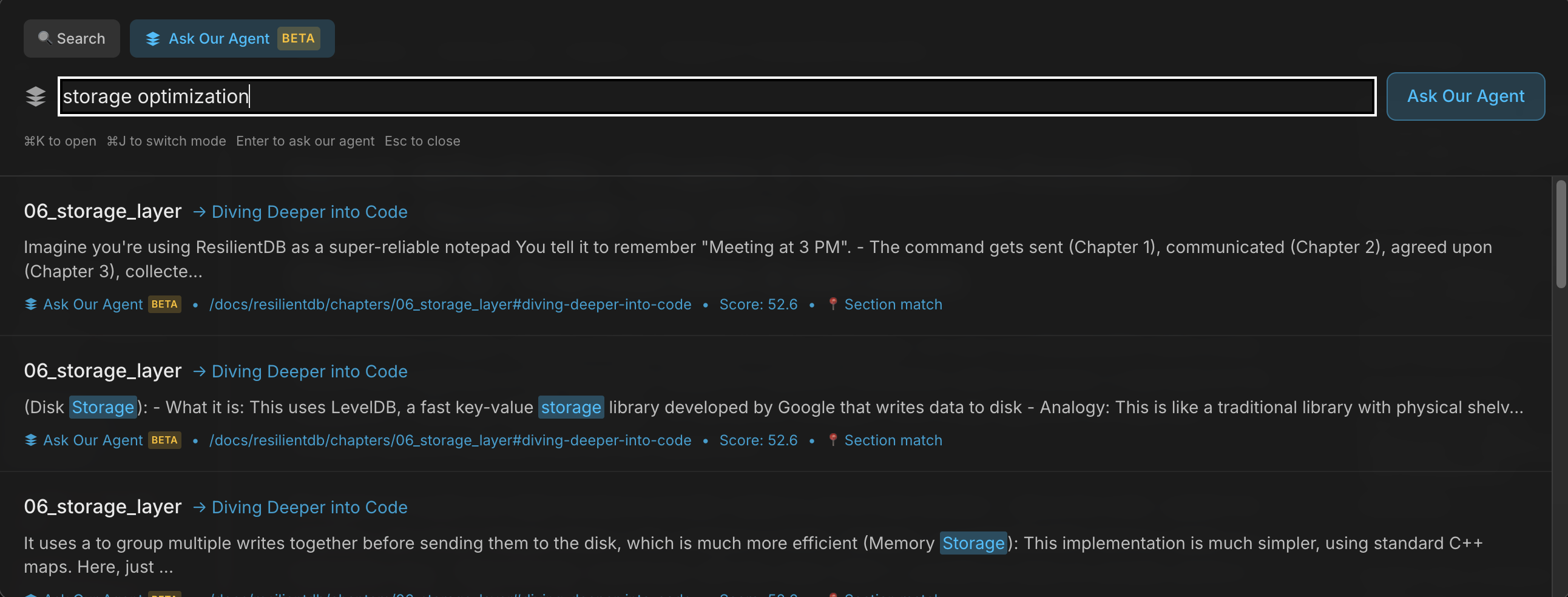 ⌘J agentic search: the same query, but results deep-link to the exact section, with scores and section matches.
Eight Chapters, Written by an AI That Read the Codebase
Maybe Beacon’s most unusual asset is a set of 8 deep-dive chapters on ResilientDB internals; client interaction, consensus, storage, checkpointing, and more, and not one paragraph was written by a human. They were generated by pointing an AI codebase-tutorial agent (Tutorial-Codebase-Knowledge) directly at the Apache ResilientDB C++ repository. The output reads like a real textbook: analogy-driven explanations (ResilientDB clients as “customer service counters at a bank”), real C++ snippets, Mermaid diagrams, and cross-references tying it all together. Instead of a human writing docs about a fast-moving system, an agent read the system and wrote the docs itself.
Docs That Update Themselves
Generating documentation once is one thing. Keeping it accurate as the codebase changes underneath it is the actual problem and this is where Beacon does something most documentation tools don’t even attempt. A push to a tracked folder triggers a workflow that hands the git diff to an agent, which reads exactly what changed and updates the relevant documentation to match, then opens a PR with the update and merges it automatically. Change the ResContract implementation, and the ResContract documentation regenerates itself, without anyone manually rewriting a paragraph. This runs across all of Beacon’s docs, not just the AI-generated chapters, meaning the “textbook” an agent wrote from the codebase doesn’t just go stale the moment the code moves on. It keeps pace with it.
It’s a small shift with a big implication: for most of software, documentation and code drift apart the moment nobody’s watching. Here, the documentation is treated as a build artifact of the code itself, every change to the system produces a matching change to the explanation of the system, automatically.
The Rest of the Stack
A few more pieces round Beacon out: a GitHub-integrated comment system that turns doc feedback into issues, GitHub OAuth with live release notes, and a custom install script generator that lets you check off the ResilientDB components you need and get back a ready-to-run INSTALL.sh. Technically, Beacon runs on Next.js 15 / React 19, Nextra 4, Mantine 8 and Tailwind 4, CodeMirror 6, Pyodide, Pagefind plus a custom indexer, solc, and DeepSeek as the LLM backend throughout.
Within ResAI, Beacon is the onboarding and reference layer, the place that gets someone from “what even is ResilientDB” to “I just ran a transaction against it.” The research layer comes next, in Nexus.
Nexus
Where Beacon teaches you how to use ResilientDB, Nexus exists to teach you why it works and to help you build from the research it’s built on. It’s an agentic RAG research copilot over the academic literature behind ResilientDB: the Byzantine Generals Problem, PBFT, Honey Badger, SpotLess, CAP theorem, and ResilientDB’s own consensus papers. You select the papers, ask questions, and get grounded, citation-backed answers with the agent’s reasoning visible the whole way through. An experimental Code mode goes a step further, it can turn a paper’s findings into an actual implementation sketch.
Architecture — Load, Index, Ask
Nexus is three paths over the same stack, not one pipeline that always runs the same way. Load is the catalog: the UI’s paper selector hits GET /documents, which lists PDFs from curated Google Drive folders and brings the titles back so you can pick what to work with. Index fires on select: POST /prepare-index sends the chosen papers through LlamaParse, chunking, and Gemini embeddings, then stores both the vectors and a parse cache in Supabase pgvector, so a paper you’ve already ingested doesn’t get re-parsed the next time you open it. Ask is the research loop: a message in chat hits POST /chat, which hands the question to NexusAgent (DeepSeek). The agent then chooses its tools, search_documents against pgvector, search_web via Tavily when the corpus isn’t enough, generates an answer, and streams it back into the chat while the preview pane shows the PDFs alongside it.
The later sections unpack each of those paths. This is the map they sit on.
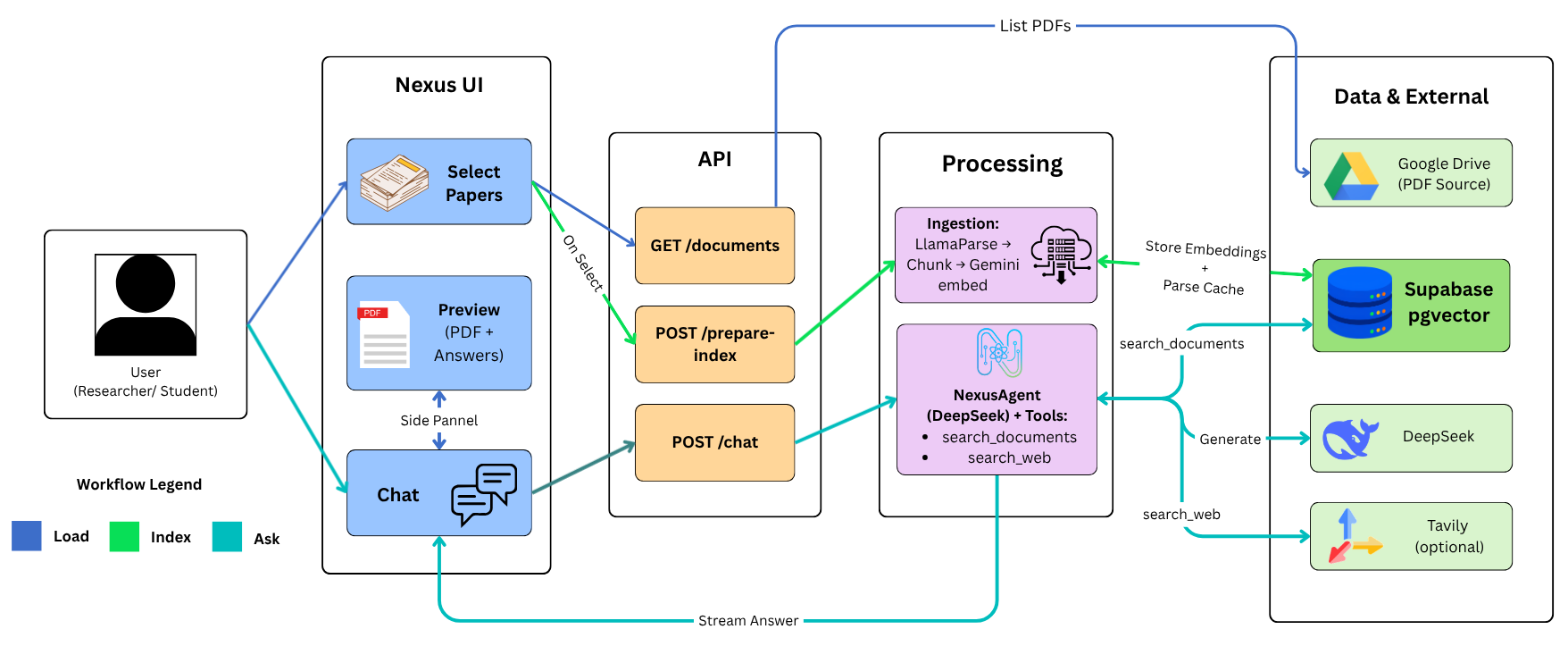 Nexus architecture — three lanes (Load, Index, Ask) from the UI through the API and processing layers out to Google Drive, Supabase pgvector, DeepSeek, and Tavily.
Why “Agentic” RAG, Not Just RAG
Classic RAG always retrieves: it takes your question, stuffs some chunks of context into the prompt, and generates an answer, whether or not retrieval actually helped. Nexus works differently; the underlying LLM decides when to search the document corpus, when to fall back to the live web, and how to combine the two, calling tools explicitly rather than having context force-fed to it. That distinction matters more than it sounds: distributed systems questions often require synthesizing across multiple papers (“compare PBFT and Honey Badger’s view-change mechanisms”), and sometimes the answer genuinely isn’t in the corpus and needs a web search instead. An agent that can choose its own tools handles both cases; a fixed retrieval pipeline can’t.
A Curated Corpus, Not the Whole Internet
Papers live in curated Google Drive folders, a “Class PDFs” set of foundational distributed systems papers and a “Books” folder for longer references, rather than being uploaded ad hoc. The corpus includes landmark work like The Byzantine Generals Problem, Time, Clocks, and the Ordering of Events, The Honey Badger of BFT Protocols, CAP Twelve Years Later, and ResilientDB-specific papers like SpotLess and RCC: Resilient Concurrent Consensus — each mapped to a human-readable title instead of a raw filename. On the /research page, you pick one or more papers from a multi-document selector, and every answer that follows is scoped to exactly what you selected. It’s less “chatbot” and more a research library with an AI librarian who already knows which paper to open.
The Ingestion Pipeline
Getting a PDF into a form an LLM can reason over is its own small pipeline. Each selected paper goes through LlamaParse (LlamaCloud’s JSON-mode parser), which converts the PDF into structured, per-page markdown, handling tables, figures, and multi-column academic layouts that a naive text extractor would mangle. That markdown is then split into document nodes, chunked at 768 tokens with 20-token overlap for semantic coherence, auto-summarized per chunk, and embedded with Gemini Embedding 001 into 768-dimensional vectors, which land in Supabase Postgres with pgvector.
Because re-parsing a 30-page BFT paper on every session would burn LlamaParse credits for no reason, Nexus caches aggressively: a parsed_documents table tracks file path, parsing status, page/chunk counts, and timestamp, and skips any file that’s already been parsed unless a re-ingestion is explicitly forced. First question on a new paper costs the parse; every question after that is instant.
The NexusAgent — Retrieval With Rules
The core of research mode is NexusAgent, a LlamaIndex AgentWorkflow running on DeepSeek’s deepseek-chat (temperature 0.1, 64K context) with two tools: search_documents, which does semantic retrieval scoped to whichever PDFs are selected, and search_web, backed by Tavily’s advanced search. The system prompt enforces some specific, deliberate constraints, the agent must announce a tool call before making it (“Let me look through the documents…”), and critically, it’s restricted to one tool call per document, never batching multiple papers into a single retrieval call, so that every claim in the final answer can be traced back to exactly which paper it came from.
There’s a real engineering wrinkle underneath this: Supabase’s vector search doesn’t support an IN filter across multiple documents, so retrieval has to loop per-document instead of querying the whole selection at once —
for (const docPath of documentPaths) {
  retriever = index.asRetriever({
    similarityTopK: 5,
    filters: { source_document: "==" docPath }
  });
}
— and results below a similarity cutoff of 0.6 get filtered out afterward. It’s a workaround, but it’s also what makes the one-tool-call-per-document rule enforceable and the source attribution reliable.
Most RAG systems hide all of this behind the scenes and just hand you a final answer. Nexus doesn’t. The chat API streams interleaved content and tool lifecycle events over a custom protocol (__TOOL_CALL__{"type":"search_documents","state":"input-available",...}), and the UI renders these as live badges, “Reading…” flipping to “Read,” “Searching the web…” flipping to “Searched the web”, inserted inline in the chat at the exact point the agent used them. You’re not just reading an answer; you’re watching the agent open each paper as it thinks.
Session Memory — Short-Term and Long-Term
Nexus uses LlamaIndex’s Memory framework to keep context across a conversation, split into two tiers. Short-term memory holds a 30,000-token window (70% allocated to raw chat history), trimming oldest messages first once it fills, but long-term blocks survive that trimming. Long-term memory itself is two blocks: a robustFactExtractionBlock that pulls up to 10 durable facts out of the conversation via DeepSeek and auto-summarizes once it’s full, and a vectorBlock that stores session-scoped vectors in Supabase for hybrid top-k retrieval. The fact-extraction block is a custom build, not the LlamaIndex default, the stock version broke on JSON wrapped in markdown code fences, so this one strips the fences, pulls the first valid JSON object out of the LLM’s output, and condenses facts by summarization once the cap is hit. Ask about PBFT in turn one, then “how does that compare to Honey Badger?” five turns later, and Nexus still has the thread, each session’s workflow is cached by sessionId, so context persists across turns without re-explaining yourself.
Code Composer — From Paper to Implementation
The experimental Code mode is where Nexus goes furthest past “chatbot.” It runs a three-agent handoff pipeline modeled on how a person would actually turn research into code: a PlannerAgent retrieves from the selected papers and produces research findings and architecture notes; it hands off to a PseudoCodeAgent, which converts that into structured pseudocode; which hands off to a CodeAgent, which produces production-ready code in TypeScript, Python, or C++. Each handoff is enforced through the system prompt, an agent must explicitly call handOff to pass control along, and the whole thing streams live into the preview panel through four visible phases: reading documents, plan, pseudocode, implementation. You can keep chatting while the code generates.
Underneath, a separate CodeComposerAgent handles implementation-aware chunk reranking, scoring retrieved chunks on implementation relevance, code quality, query alignment, and whether they contain actual code examples, with a weighted blend of 30% original similarity score and 70% agent analysis, plus a 1.3x bonus multiplier for chunks that include code. It’s a small detail, but it reflects the same instinct behind the rest of Nexus: a chunk that’s semantically similar to your question isn’t necessarily the chunk that’s actually useful for writing code.
Interface and API
The /research page is a split-panel layout: document sidebar and chat on the left, a tabbed preview panel on the right, one tab per selected PDF (rendered via Google Drive’s preview), plus a live tab for streaming code generation. Each session is isolated by URL (/research?session=<uuid>), so switching papers or starting fresh doesn’t bleed context between sessions. A single /api/research/chat endpoint handles both research and code modes, the request body just adds a tool: "code-composer" flag and a target language to switch into Code mode, and returns a streaming response.
The Stack, and Why DeepSeek + Gemini
Nexus is built on Next.js 15 and React 19, orchestrated with LlamaIndex TS end to end — ingestion, retrieval, agent workflows, and memory all run through it. DeepSeek handles reasoning, chat, fact extraction, and code generation; Gemini Embedding 001 handles the vector embeddings; Supabase/pgvector is the vector store; LlamaParse handles PDF parsing; Tavily provides the web-search fallback. Splitting the LLM from the embedding model is a deliberate choice, it means either one can be swapped independently, changing the reasoning model without re-embedding the entire corpus, or upgrading embeddings without retraining the agent’s behavior.
Beacon and Nexus end up complementary rather than overlapping: Beacon is hybrid keyword-plus-AI search over documentation with a lightweight inline assistant; Nexus is full agentic RAG with tool use, session-scoped memory, and citation-backed answers over primary research. One teaches the ecosystem. The other teaches the theory underneath it, and, increasingly, helps write the code that comes out of it.
ContractForge
Writing a smart contract is really three jobs wearing one trenchcoat: deciding what it should do, writing correct Solidity for it, and then actually getting it onto ResilientDB — which is not “just another EVM chain you paste into Remix.” ContractForge collapses all three into one conversation: describe a contract in plain English, get back compilable Solidity, a live analysis, and a ResVault-ready deployment JSON.
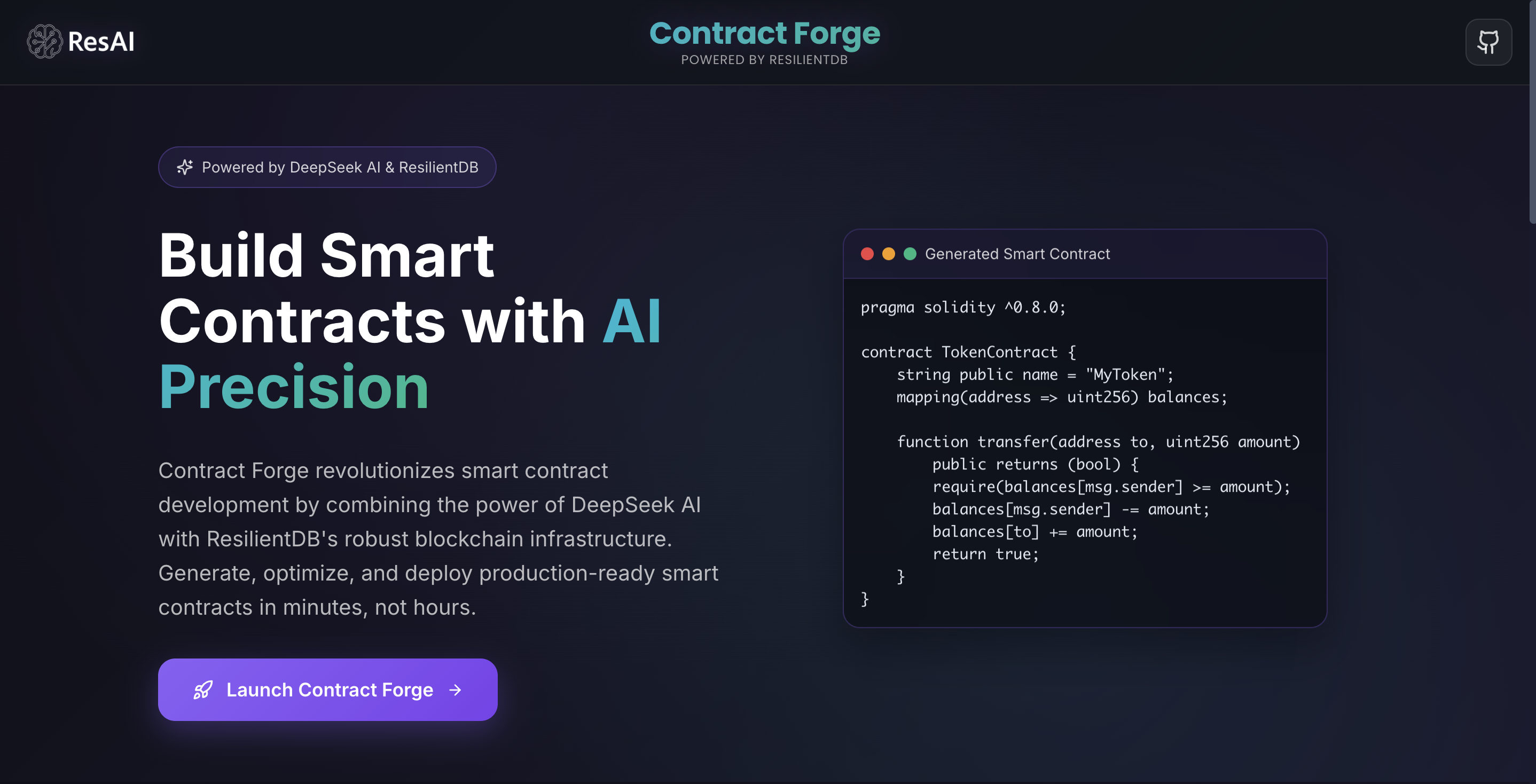 ContractForge’s landing page — generate, analyze, and deploy ResilientDB contracts from a sentence.
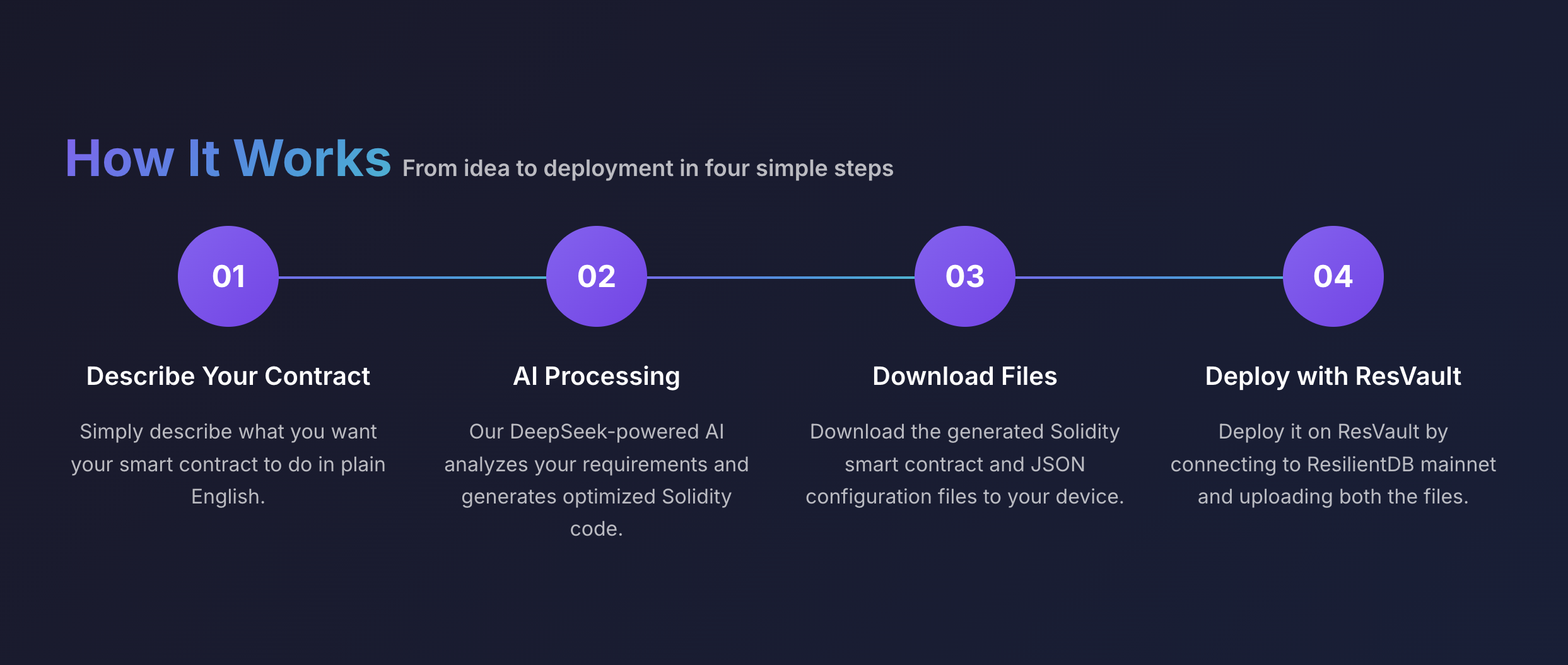 Four steps: describe it, let DeepSeek write the Solidity, download
 .sol + JSON, deploy through ResVault.
The actual studio is a chat. New conversations start empty, with example prompts, a recents sidebar, and a Templates button for the cases where you don’t need an LLM at all.
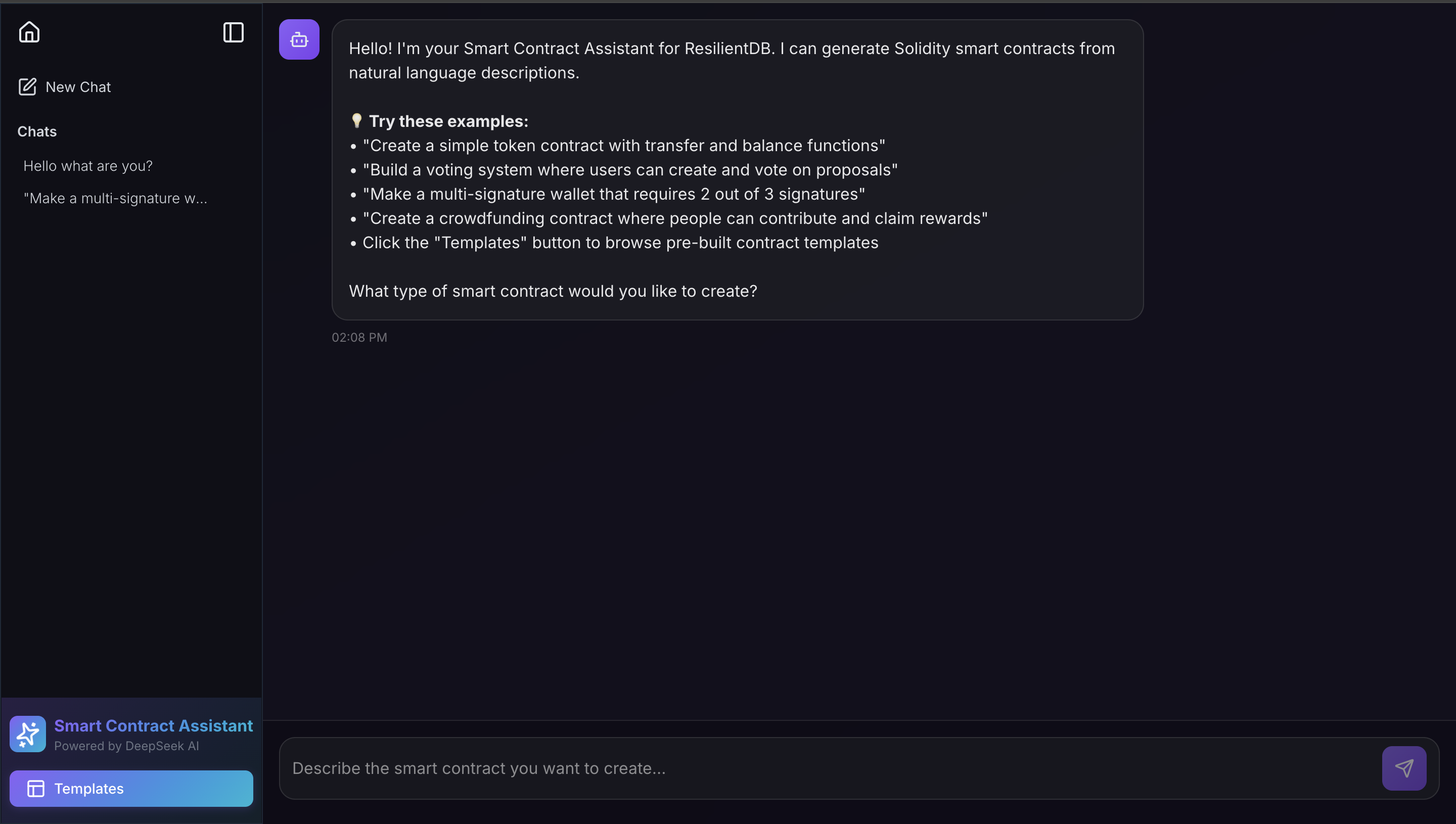 The studio before a prompt — example contracts on the left of the input, Templates in the sidebar.
Not a Chatbot That Happens to Know Solidity
The model isn’t a general-purpose assistant with a Solidity system prompt bolted on. Two stacked prompts shape it for ResilientDB’s dialect: a persona that defines four jobs: generate, explain, answer, guide deployment and a few-shot wrapper that pins the house style. Always pragma solidity >= 0.5.0, events on every state change, access control, gas-aware patterns, and three gold-standard examples (ERC20, 2-of-3 multi-sig, voting) injected so the model copies structure, not vibes. Generation runs at temperature 0.3, conservative on purpose.
That wrapper also gates generation against conversation. “Make me a token” gets a .sol file. “How do you generate contracts in sync with ResilientDB?” gets a teaching answer — Solidity >= 0.5.0, Homestead-era compile, deploy via ResVault, not another contract.
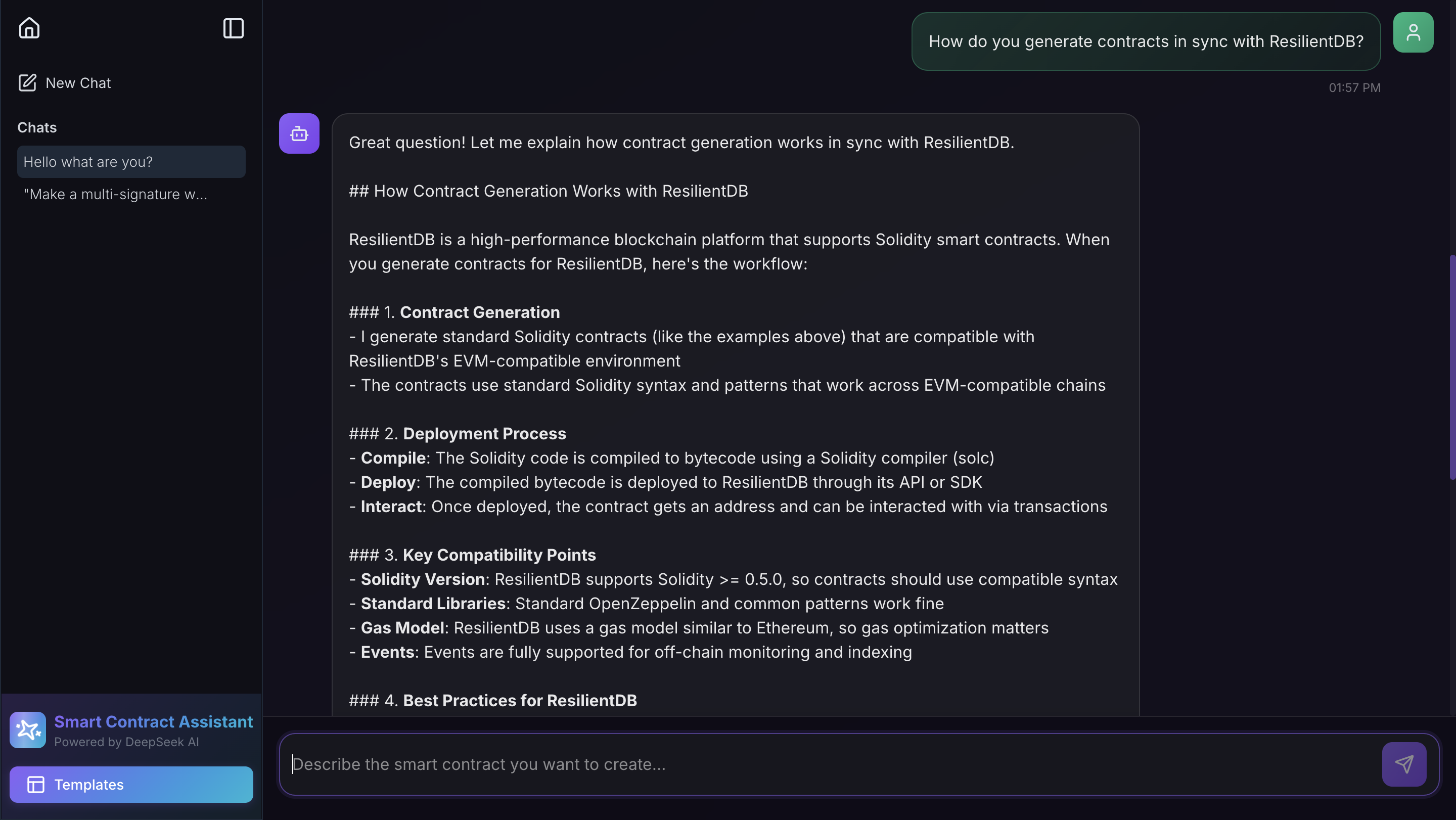 Same studio, different job: a question about ResilientDB compatibility gets an explanation, not a
 .sol file.
Alice and Bob — From a Sentence to DualApproval
The prompt that makes the rest of this concrete is almost throwaway:
“create a contract where Alice and Bob need to approve before any changes can be made.”
What comes back is DualApproval: pragma solidity >= 0.5.0, Alice and Bob as named roles, events on every state change, and a green Valid Solidity badge, not a sketch, a contract that already looks like the house style.
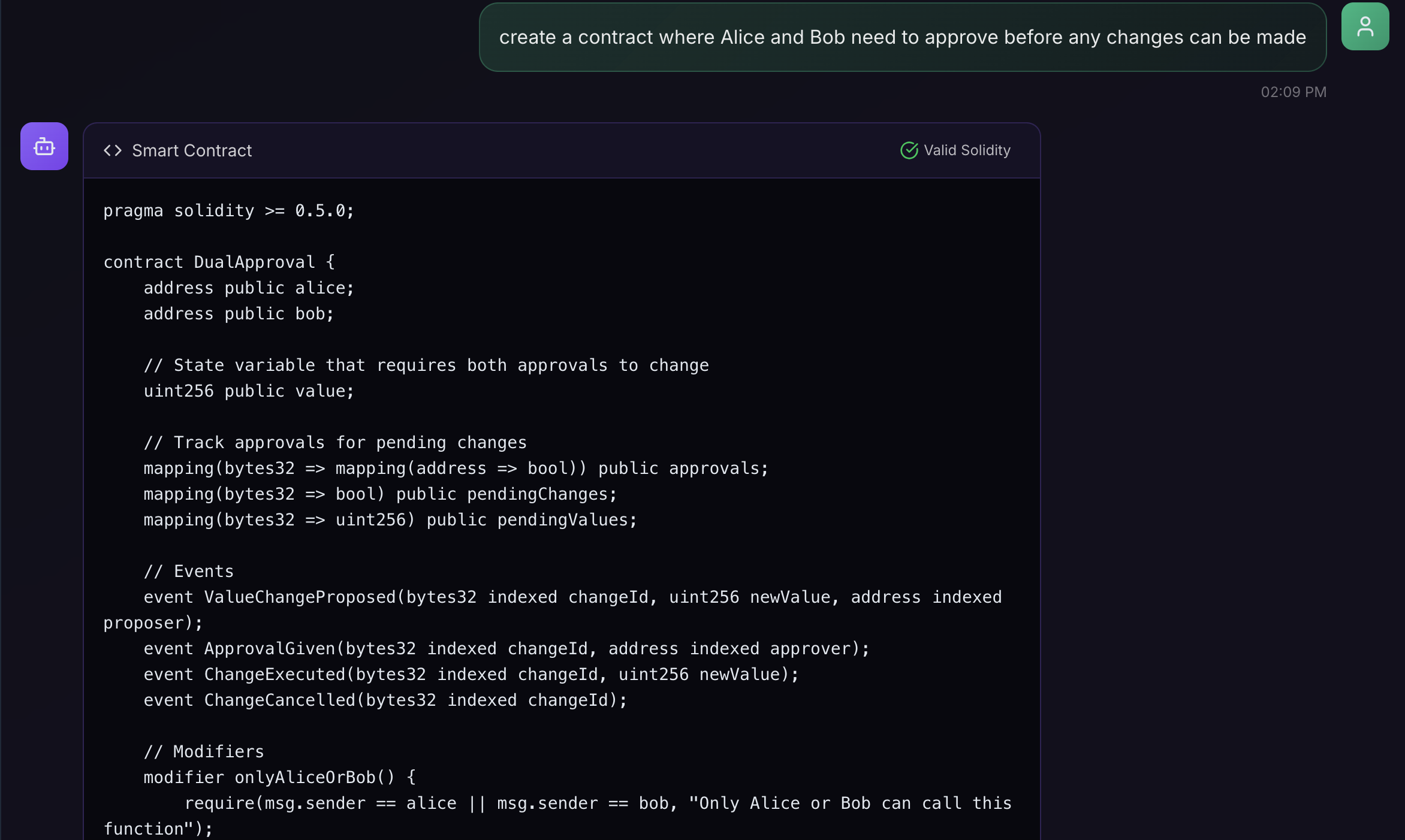 The Alice and Bob prompt, and the
 DualApproval contract it produced — Valid Solidity, ResilientDB pragma, roles and events already in place.
The interesting mechanics sit in two functions. proposeChange builds a changeId and auto-approves the proposer; approveChange executes only once both Alice and Bob have signed off:
function proposeChange(uint256 _newValue) public onlyAliceOrBob returns (bytes32 changeId) {
    require(_newValue != value, "New value must be different from current value");
    changeId = keccak256(abi.encodePacked(_newValue, block.timestamp, msg.sender));
    pendingChanges[changeId] = true;
    pendingValues[changeId] = _newValue;
    approvals[changeId][msg.sender] = true; // proposer auto-approves
    emit ValueChangeProposed(changeId, _newValue, msg.sender);
}

function approveChange(bytes32 _changeId) public onlyAliceOrBob {
    require(pendingChanges[_changeId], "Change does not exist or already executed");
    require(!approvals[_changeId][msg.sender], "Already approved this change");
    approvals[_changeId][msg.sender] = true;
    emit ApprovalGiven(_changeId, msg.sender);
    if (approvals[_changeId][alice] && approvals[_changeId][bob]) {
        executeChange(_changeId);
    }
}
That’s the whole idea of the prompt, encoded: one party proposes, both must approve, then the value moves. The validator reads the same file as a passport, 8 functions, 4 events, 12 state variables and flags the block.timestamp inside that keccak256 as miner-manipulable. The contract is valid. It is not blindly trusted.
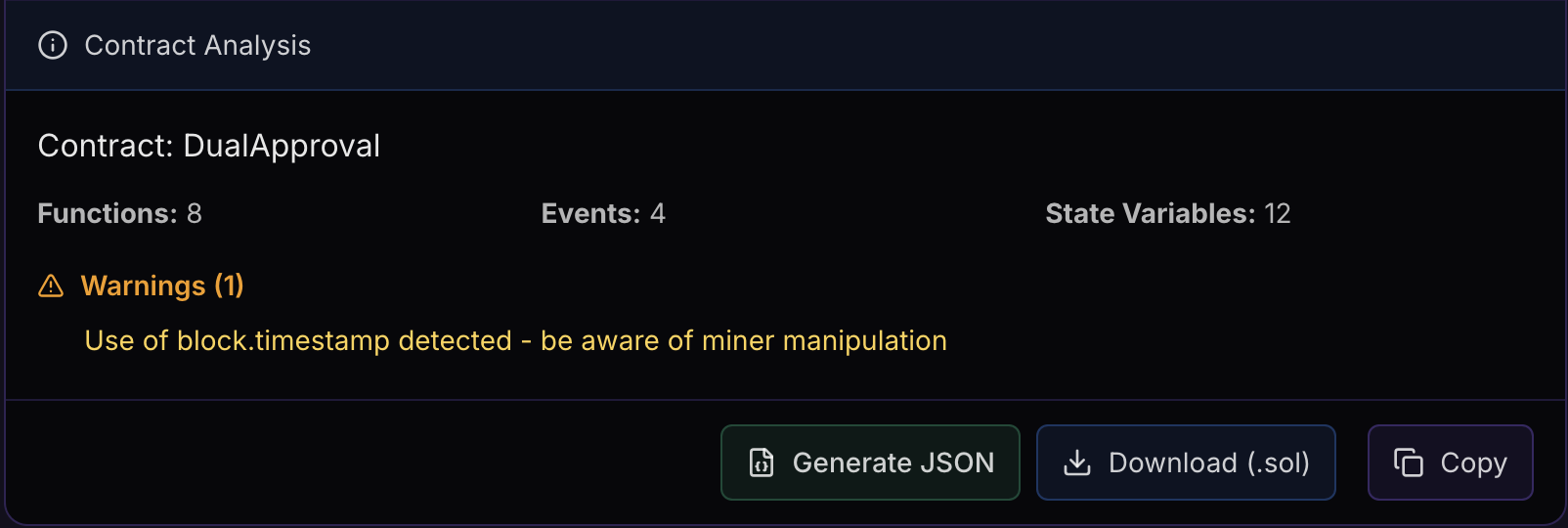
DualApproval as a contract passport: counts, a block.timestamp warning, and Generate JSON / Download / Copy sitting on the same panel.
The analysis is a real parse, not a sniff test. A fast check (pragma, contract, function) is what paints the green badge; underneath, ContractValidator extracts name, functions, events, and state, then grades errors (missing pragma, no contract), warnings (tx.origin, block.timestamp, a pragma that isn’t >= 0.5.0), and suggestions (state-changing functions with no events, uncached array.length). Quietly sitting in the same validator, not yet in the UI, is a deployment-script generator that already knows ResilientDB’s actual incantation — solc --evm-version homestead --combined-json bin,hashes and the contract_service_tools bazel invocation.
ResVault JSON — The Part That Actually Ships It
A .sol file alone doesn’t get you onto ResilientDB. ResVault wants a flat deployment payload, contract_name plus an arguments string, not a generic ABI dump. Generating that is its own model call, temperature 0.1, with a rigid delimiter protocol, then a modal you can copy or download as {ContractName}_config.json. For DualApproval those arguments are Alice’s address, Bob’s address, and an initial value:
{
  "contract_name": "DualApproval",
  "arguments": "\"0xAliceAddress\",\"0xBobAddress\",100"
}
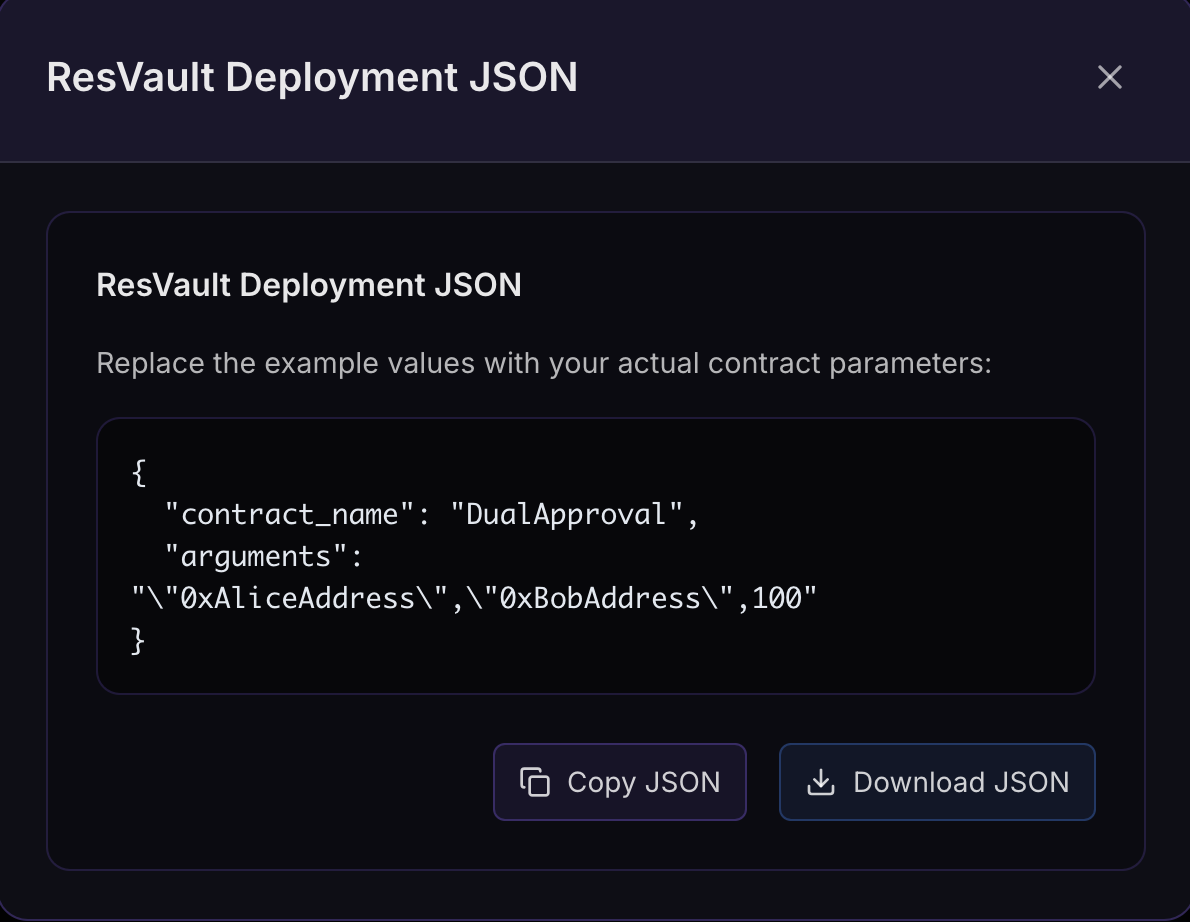 The ResVault payload for
 DualApproval — Alice, Bob, and an initial value of 100. Copy or download, then onto mainnet.
Download the .sol, download the JSON, open ResVault, deploy. Sentence to on-chain.
Two Generation Engines, Not One
Not every contract needs an LLM. The sidebar’s Templates button opens a foundry of five typed generators: ERC20, ERC721, Voting, Multi-Signature Wallet, Crowdfunding, each with a validated parameter form and a pure generateCode(params) that interpolates into a NatSpec-documented contract. Zero model calls, zero variance. ERC20 does the real decimal math; crowdfunding converts days to seconds at generation time; multi-sig bakes the threshold into the logic.
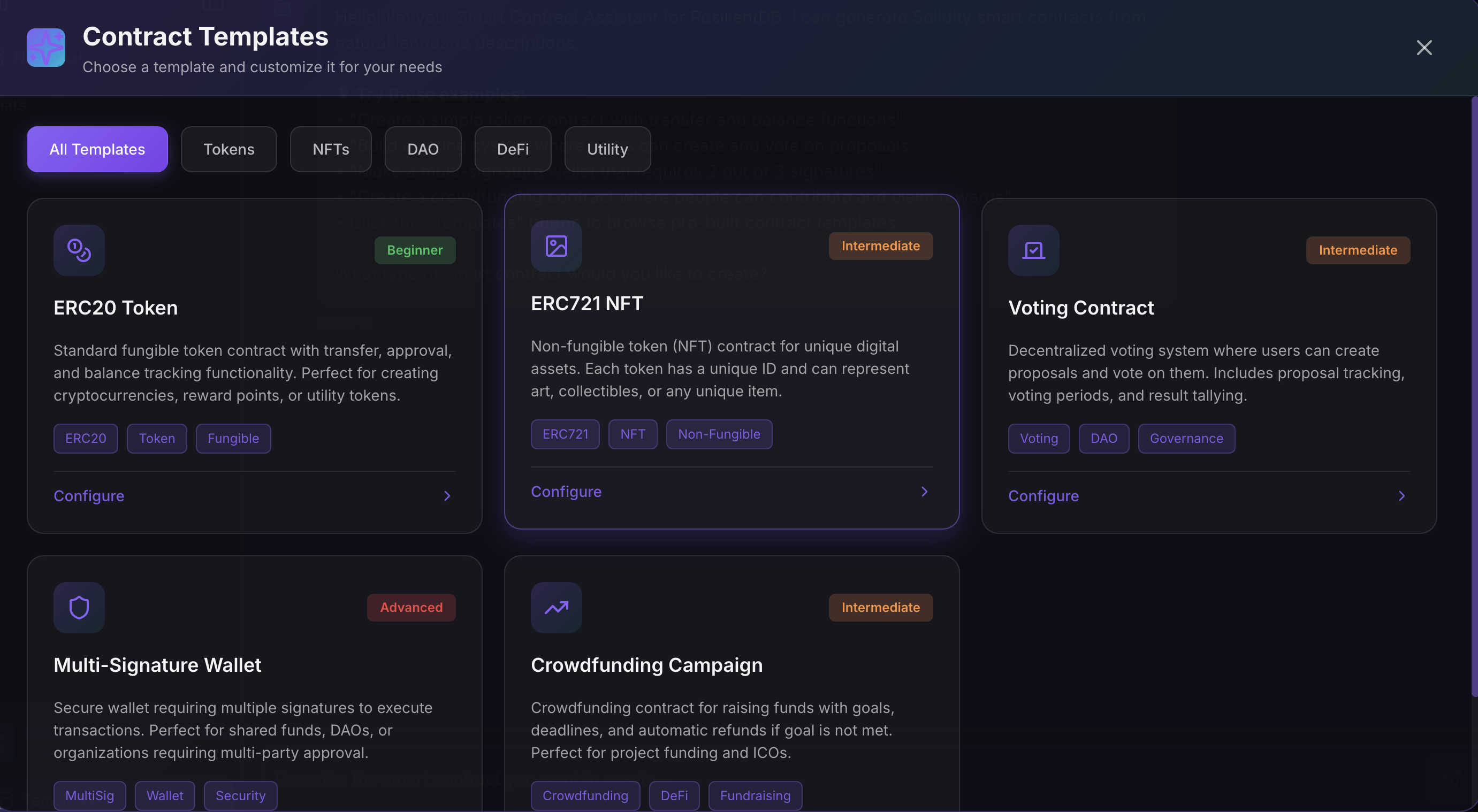 Five templates, from beginner ERC20 to advanced multi-sig — configure the knobs when the pattern is already known.
Reach for the LLM when the request is novel (“Alice and Bob must both sign”). Reach for a template when you just want the knobs turned.
Built for ResilientDB, Not Generic Solidity
What separates this from “a Solidity GPT with a nice UI” is how much ResilientDB knowledge is baked into every layer: the >= 0.5.0 pragma in the prompt, the examples, the templates, and the validator; the Homestead compile ResilientDB actually expects; the ResVault JSON shape; the path ending at the ResVault extension and mainnet. The DeepSeek key never reaches the browser — every call goes through /api/deepseek and conversations persist at /chatbot?chatId=<uuid> so a thread is a real session, not a demo that forgets itself on refresh.
Together with Beacon’s onboarding and Nexus’s research grounding, ContractForge closes the loop: learn the system, understand the theory behind it, and ship something onto it, in plain English, in minutes.
Beyond These Three
AI-integrated tooling has no ceiling, and the ResAI suite is still expanding. Beacon, Nexus, and ContractForge cover the path into ResilientDB; other tools cover what happens once you’re already inside it. One of those is DeepObserve — an MCP-connected observability layer for ResilientDB’s consensus protocols. It instruments a running cluster with eBPF sidecars (ResView for live PBFT traces, ResLens for CPU and memory flamegraphs) so an AI agent can query runtime behavior, watch subprotocol execution, and inspect call stacks without sitting on the database hot path. Same instinct as the rest of ResAI: if the system is hard to see, put an agent where a person would otherwise have to stare.
Conclusion
ResAI didn’t try to make ResilientDB simpler than it is. It tried to make the path into it shorter, a system that used to demand weeks of self-guided reading, now something you can explore, question, and build on in an afternoon.
None of these tools is the end state. The bet is simpler than any one of them: the fastest way to grow a system this ambitious is not just to keep building it, but to keep shrinking the distance between discovering it and actually using it. Two years in, that’s still the project; turning friction into flow, one tool at a time.